Cloud kitchen as a service · for multi-brand owners
Run every brand and branch from one screen.
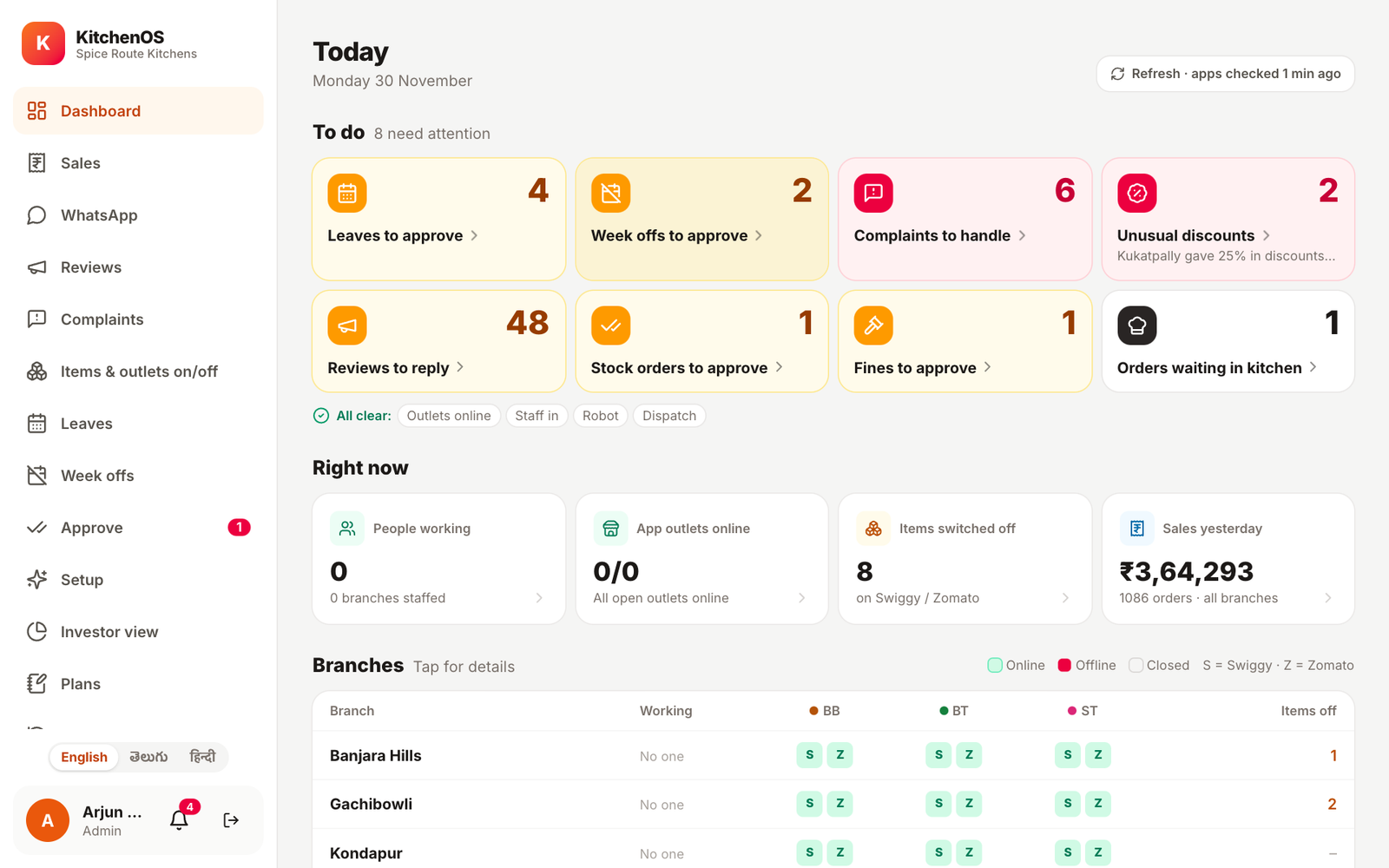
KitchenOS pulls your Swiggy, Zomato, POS and WhatsApp orders into one place, watches your money and your menu all day, and runs your team's attendance and pay. It was built inside a working multi-brand cloud kitchen in Hyderabad, and it runs there every day.
The demo is a made-up company, Spice Route Kitchens. Tap a role (Owner, Branch manager, Kitchen, Rider or HR) to log in. Nothing you do there touches a real kitchen.
The problem
What a cloud-kitchen owner deals with every day
Examples use our demo company, Spice Route Kitchens: 3 brands (Biryani Bros, Bowl Theory, Sweet Tooth Co.) across 6 Hyderabad branches.
Four portals, four logins
Swiggy, Zomato, the POS and WhatsApp each have their own dashboard. With 3 brands and 6 branches, that is dozens of screens to check before lunch.
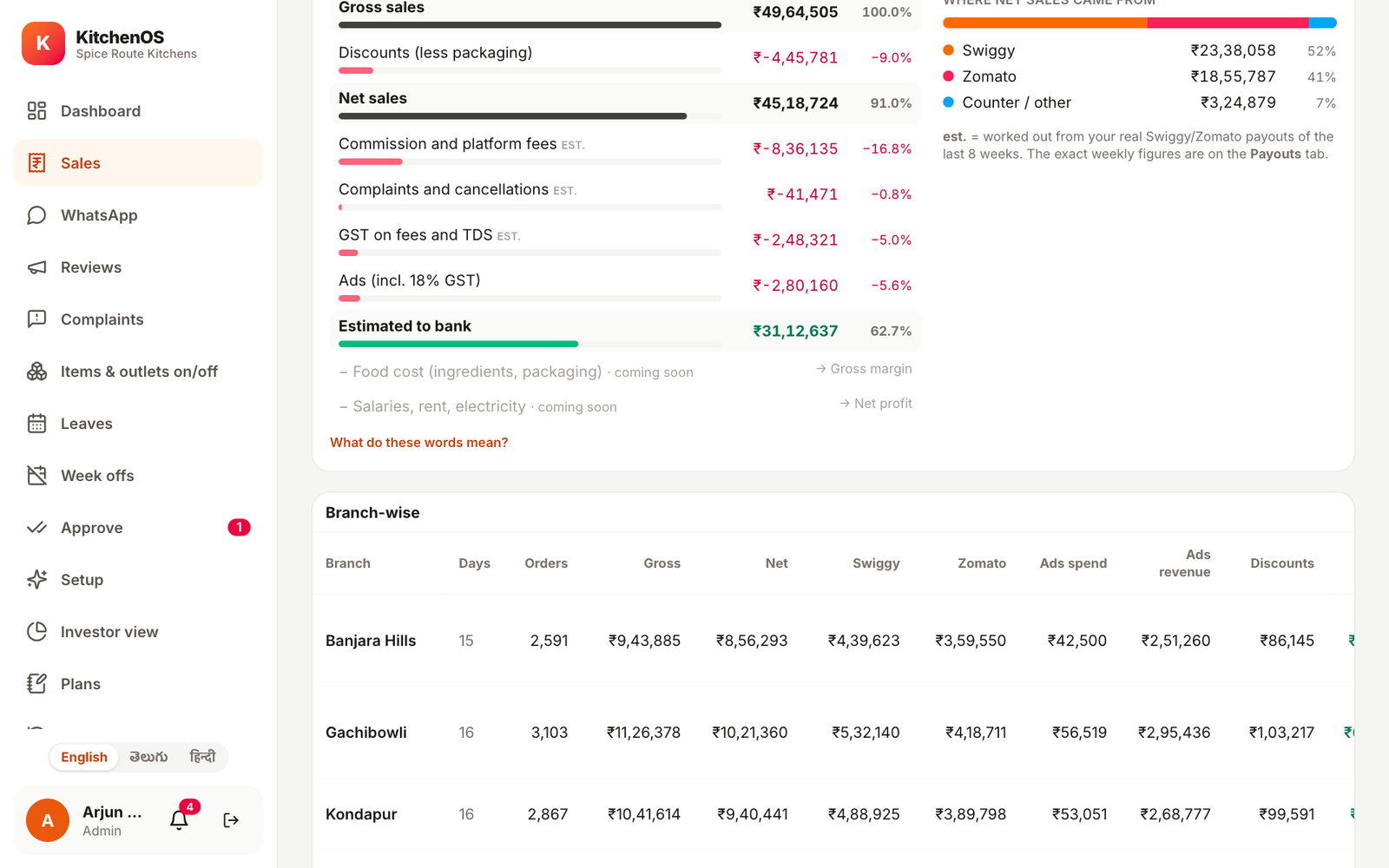
KitchenOS: one sales screen for every brand, branch and channel.
Ads and discounts bleed money
A "60% off up to ₹120" offer left running at Bowl Theory Kukatpally can cost more than it brings in. Nobody notices until the payout lands.
KitchenOS: return on every ad and discount, plus a discount watch alert.
Payouts eaten by deductions
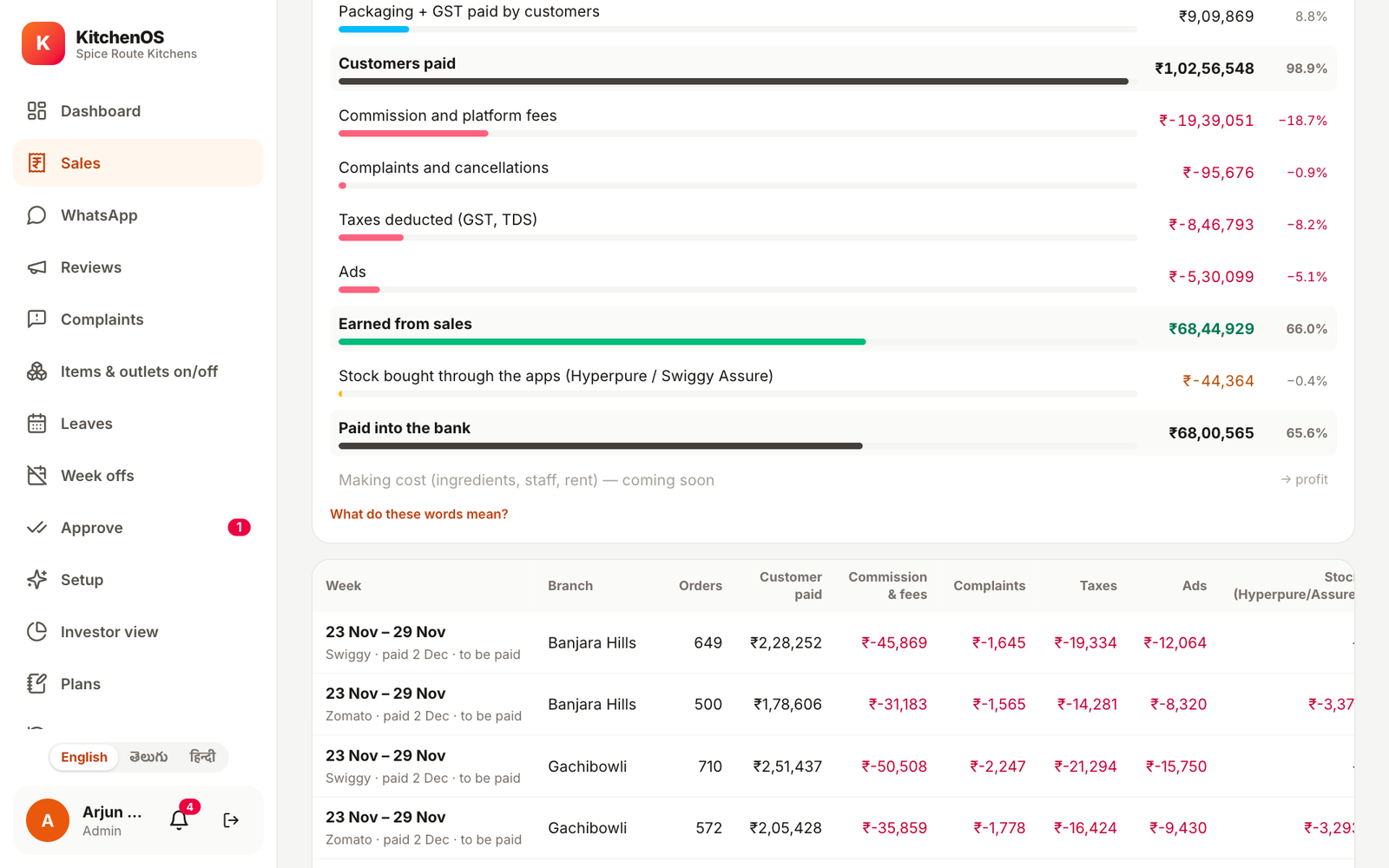
Commission, GST, ads, packaging, supply deductions and penalties come off before you see a rupee. The weekly statement is hard to check against your own sales.
KitchenOS: every payout broken down, matched against daily sales.
Items go off at peak time
Someone switches off Chicken Dum Biryani at 1 pm because one ingredient ran out, and forgets to switch it back on. Or the whole outlet goes offline.
KitchenOS: alerts the moment an item or outlet goes off, with a log.
Staff come late, or not at all
Paper registers and WhatsApp "reached" messages are easy to fake. Late arrivals and missed shifts turn into arguments at salary time.
KitchenOS: selfie attendance that only works inside the branch.
Complaints with no owner
"Cold food, missing raita." Which branch, which shift, who packed it? Bad reviews sit unanswered and ratings drop.
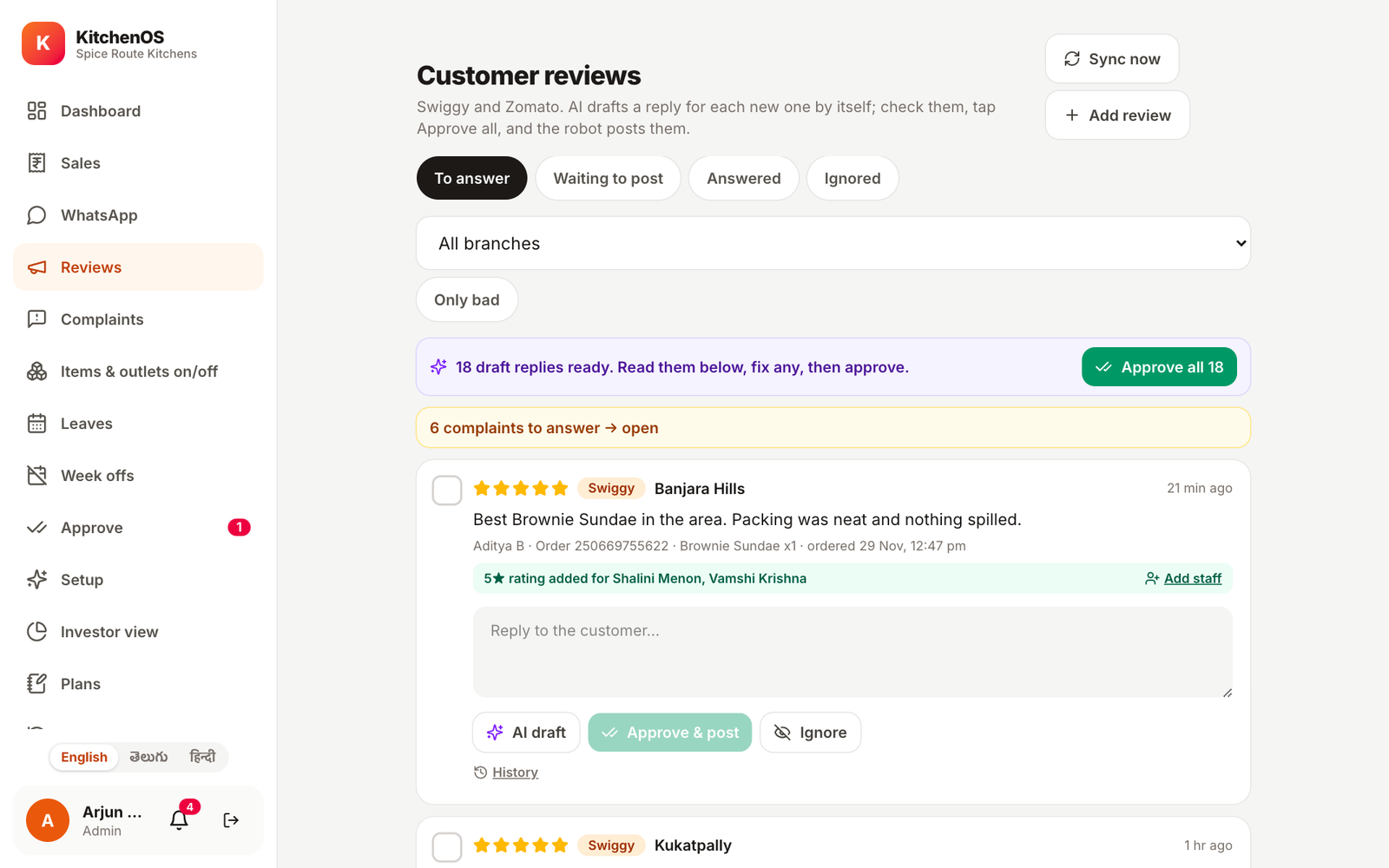
KitchenOS: complaints linked to the staff on shift, AI-drafted review replies.
What KitchenOS does
Module by module
- Orders from every platform, synced through an always-on server, so you never log in to the portals yourself.
- Sales by brand, branch, channel, day and hour. Dine-in and offline orders too.
- Owner dashboard and a simple investor view.
- Weekly payouts split into commission, taxes, ads, deductions and penalties.
- Each payout week checked against daily sales, so missing money shows up.
- Ad and discount return per brand and branch. Discount watch flags offers that lose money.
- Expenses per branch.
- All reviews in one inbox, with an AI-drafted reply you approve or edit.
- Complaints linked to the branch, the order and the staff on shift at that time.
- Review log to see patterns by item and branch.
- Alert when any item or outlet goes off on any platform, with sound alerts on the phone.
- History of who switched what, and for how long.
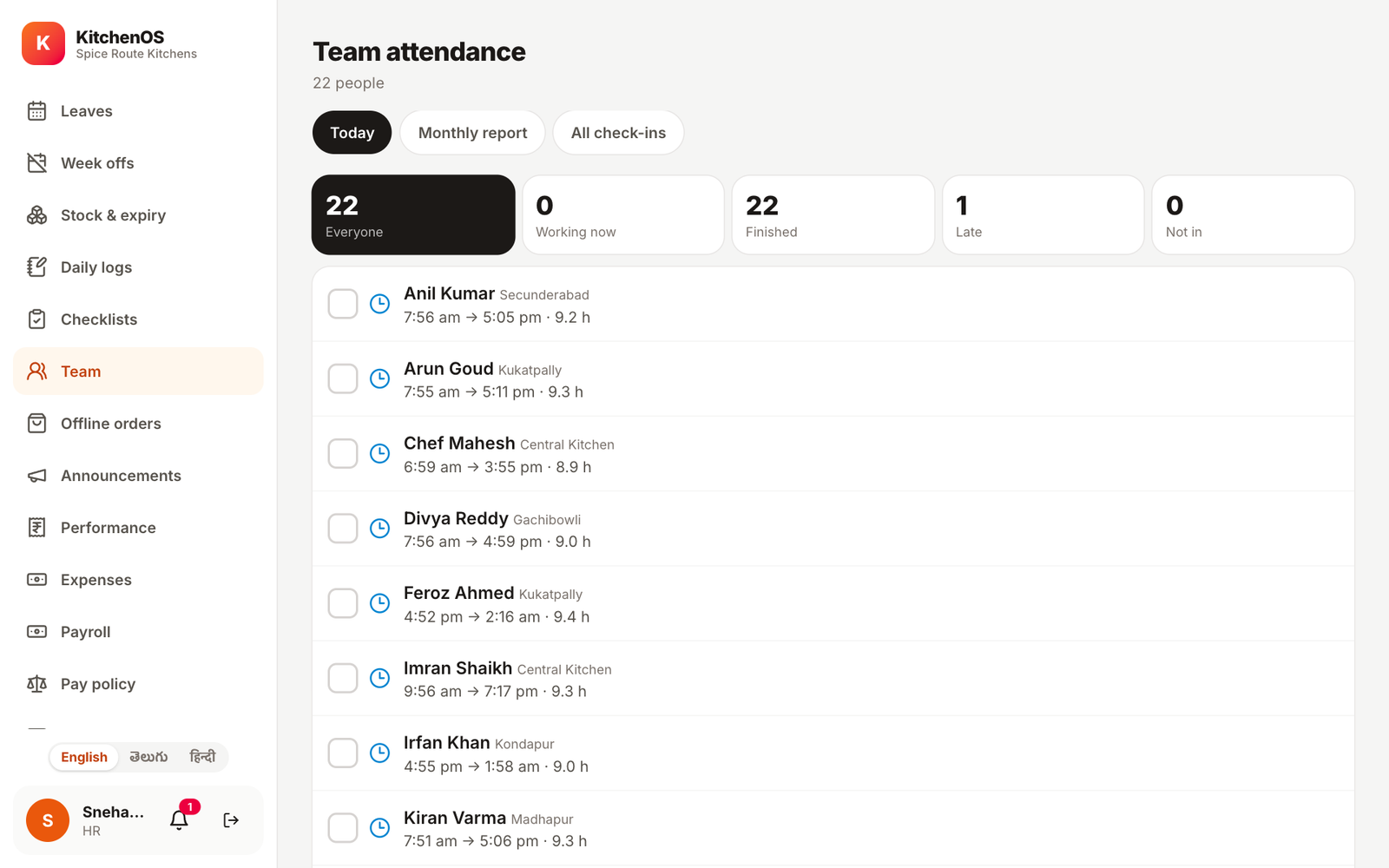
- Selfie attendance with a geofence around each branch. Late marks are automatic.
- Shifts, week offs and leave requests with approvals.
- Payroll from attendance, with your own pay policy: fines for lateness, incentives for good ratings.
- Staff see their own pay, profile and announcements in the app.
- Stock and expiry tracking, with wastage.
- Branches order from the central kitchen. Orders get approved, made, dispatched, delivered and received, each step on a phone.
- Daily checklists and daily logs per branch.
- Roles for owner, branch manager, outlet staff, kitchen, rider and HR. Each sees only what they need.
- Brands, branches, products and notification rules, all editable from screens. No developer needed.
- Android app for staff, plus the web app for owners and managers.
Add-ons
Extra muscle, when you want it
CCTV hygiene watch
Your existing kitchen camera checks for caps, gloves and hand-washing. A miss is logged with a snapshot and can raise a fine under your pay policy automatically.
Example: no cap at the Gachibowli fry station, 7:42 pm. Snapshot sent to the manager, ₹50 fine added.
CCTV Advanced (custom price): more cameras per site, counter and packing-table checks, crowding and idle-staff alerts, footage search by order. We survey your camera setup first.
AI voice calls in Telugu
When something needs action, KitchenOS phones the right person and speaks in Telugu (or Hindi, English). Staff can answer by voice.
Example: "Madhapur lo Paneer Bowl off ayyindi. Malli on cheyyandi." Call goes to the shift manager.
Complaint and deduction calls: "Ravi garu, mee shift lo Swiggy complaint vachindi: raita missing. Pay policy prakaram ₹50 deduction. Em jarigindo cheppandi." The answer is recorded against the complaint, so staff always hear about a deduction before payday.
WhatsApp ordering bot
Your brand's own ordering portal on WhatsApp: menu, payment, live updates and delivery (₹75 up to 3 km). No platform commission. How it works.
Example: a repeat Sweet Tooth Co. customer reorders in 4 taps.
Managed ops · cloud kitchen as a service
Don't want to watch dashboards? Our team runs the back office for you.
You focus on food, new brands and growth. Our ops team works inside your KitchenOS every day and talks to your staff for you.
- Daily watch: outlets offline, items switched off, late openings, deep discounts. We act within minutes, not at month end.
- We talk to your employees: calls and WhatsApp to branch staff in Telugu, Hindi or English: stock outs, late arrivals, checklists not done, complaints on their shift.
- Complaints and reviews: we reply to every review, chase refunds and deductions, and close each complaint with the staff involved.
- Platform admin: offers, ads, menu and timings on Swiggy and Zomato, with your approval for anything that costs money.
- Payroll support: monthly attendance, fines and incentives checked before salary day.
- Weekly owner report: what happened, what it cost, and what to change next week.
Priced per outlet, depending on how many brands and how much you want us to handle. See pricing.
WhatsApp ordering · your brand's own ordering app, on WhatsApp
Customers order from you directly. No website, no app download, no platform commission.
Every brand gets its own WhatsApp ordering bot. Customers message your number, see the menu, order, pay and track, all inside WhatsApp, which they already use every day.
Order in a few taps
Menu with photos and prices, cart, add-ons, nearest branch picked from the customer's location. Repeat customers reorder their last order in 4 taps.
Pay online or cash
UPI and card payment links inside the chat, or cash on delivery. Paid orders go straight to the kitchen.
Delivery handled
We arrange the rider: ₹75 for up to 3 km, with a small extra charge for each km beyond. Partners like Porter, Shadowfax and Rapido, or your own rider.
Live order board
Orders appear in KitchenOS within seconds. Staff press Preparing, Ready and Out for delivery, and the customer gets each update on WhatsApp.
Your customers, your data
Every customer's phone number, orders and spend stays with you, not with a platform. Ratings are collected after each order.
Bring them back
Send offers and new-menu messages to past customers, and get help-requests (handoffs) to a person when the bot can't answer.
Double Ka Meetha × 1 · ₹129
Delivery (2.4 km) · ₹75
Total ₹553
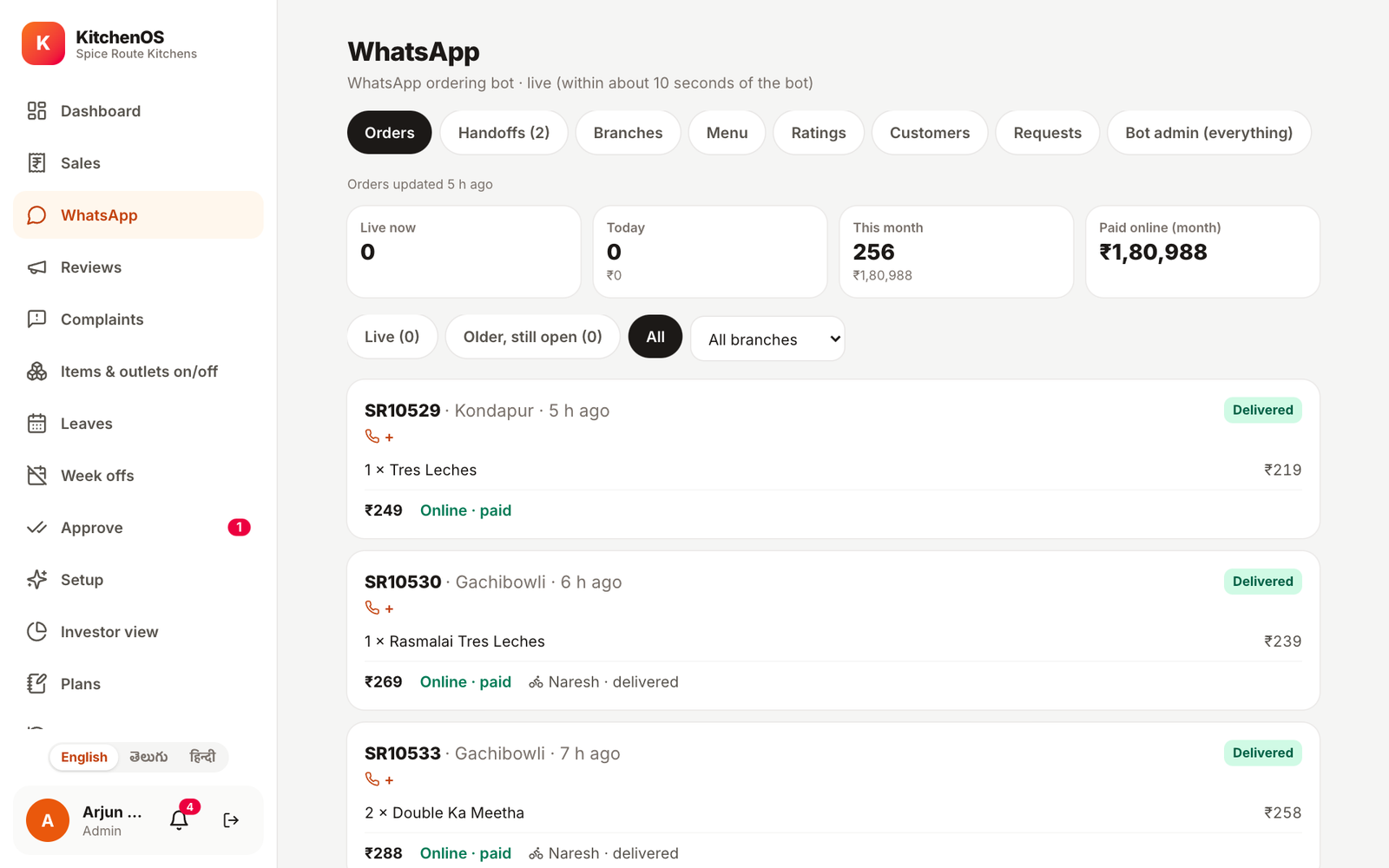
This number is a real brand's ordering bot running on KitchenOS. Say "Hi" to see the menu and how ordering works; an order you place and pay for is a real order. To see the staff side, log in to the demo as Owner and open WhatsApp.
Marketplace · brand collaboration Coming soon
Earn more from the same kitchen by hosting partner brands.
Many kitchens have spare capacity at some hours. KitchenOS matches you with other brands, such as an ice-cream, dessert or beverage brand, that want to sell from your area without opening a kitchen.
For kitchen owners
List the hours, freezer and counter space you can spare. Add a partner brand's menu to your Swiggy and Zomato listings and earn a share of every order.
For brands
Reach new areas through kitchens that already run on KitchenOS: same SOPs, same stock tracking, same quality checks and CCTV hygiene watch.
Everything tracked
Partner stock, sales and payouts are tracked per brand, so each side sees exactly what it earned.
Example
Sweet Tooth Co. adds a partner ice-cream brand to its Kukatpally and Banjara Hills kitchens: no new rent, one freezer, a revenue share on every scoop.
How setup works
A guided wizard. Most owners finish in one sitting.
Each customer gets their own private copy: their own database and their own web address.
- Company. Name, logo, support phone.
- Brands. Add each brand with its logo and cuisine.
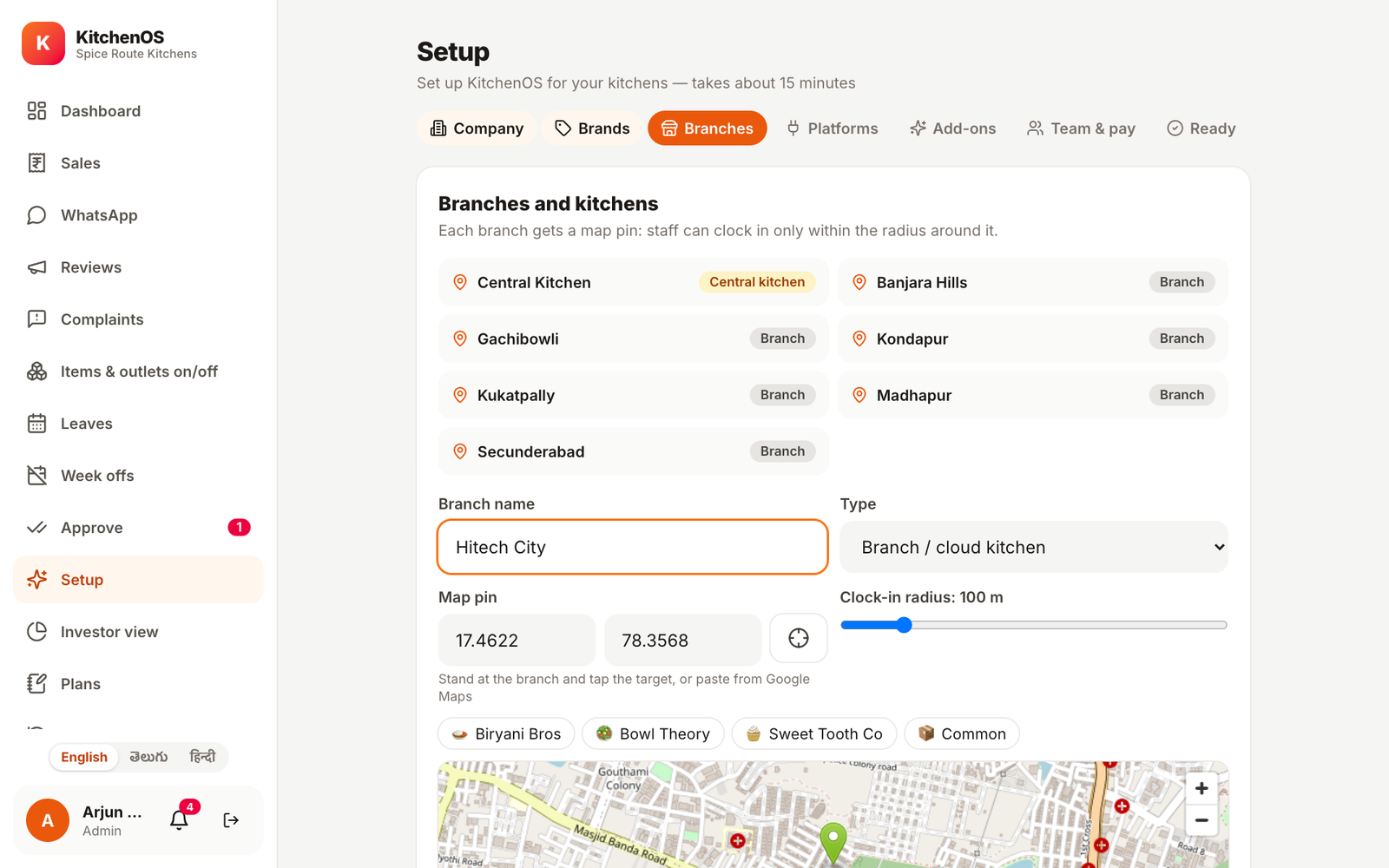
- Branches. Drop a pin on the map for each branch, set the attendance radius and opening hours.
- Platforms. Enter Swiggy, Zomato and POS logins. When a platform asks for an OTP, it comes to you in the app and you type it once.
- Team. Add people one by one or upload a CSV. Pick each person's role and branch.
- Pay policy. Set shifts, late fines and incentives, or start with our default.
- Done. Data starts flowing. Staff install the Android app and mark their first attendance.
Self-guided tour · 15 minutes
Try it yourself: click by click
Everything in the demo is made up: Spice Route Kitchens, its staff and its orders. New orders and reviews arrive every few minutes, so the screens look alive.
Before you start
- Open the live demo in a new tab and keep this page next to it.
- Have the KitchenOS demo app on an Android phone for the staff part, if meeting in person.
- Ask the prospect two things up front: how many brands and branches, and which pain hurts most. Spend extra time there and trim elsewhere.
- The login page has one-tap buttons: Owner · Branch manager · Kitchen · Rider · HR. Use the profile menu to log out between roles.
Set the scene
- Stay on the login page. Point at the five role buttons.
"This is Spice Route Kitchens, a made-up group with 3 brands and 6 branches. I'll show you what the owner sees, then a manager, the kitchen, a rider and HR."
One screen for all sales
- Tap Owner. You land on Dashboard: today's sales across all brands and branches.
- Open Sales. Switch the brand filter to Biryani Bros, then the branch to Kondapur. Show the channel split: Swiggy, Zomato, POS, WhatsApp.
- Switch the range to the last 30 days. Point at the weekend bumps.
- Open the payouts view. Pick last week. Walk through commission, ads, deductions, then the amount that actually reached the bank.
- Show the discount watch alert on a losing offer.
"You never log in to Swiggy or Zomato for this. Our server does it for you, all day."
Reviews and complaints
- Open Reviews. Pick a 2-star review. Show the AI-drafted reply. Edit one word and approve it.
- Open Complaints. Open one: it shows the order, the branch and who was on shift when it was packed.
"Every complaint has a name against it. That changes behaviour in a week."
Items going off
- Open Items & outlets on/off. Show an item switched off at lunch, how long it stayed off, and the alert that went out.
- Mention Sound alerts: the manager's phone rings when it happens.
A branch manager's morning
- Log out. Tap Branch manager. Point out the smaller menu: only their branch.
- Open Attendance: who is in, who is late, with selfies.
- Open Checklists: tick the opening checklist.
- Open Stock & expiry: an item expiring tomorrow is flagged.
- Open Order: place an order to the central kitchen.
Central kitchen
- Log out. Tap Kitchen. The Orders Board shows the order the manager just placed.
- Open To Make: total quantities to cook across all branch orders.
- Open Dispatch: mark the Kondapur order as packed and sent.
Delivery to the branch
- Log out. Tap Rider. Open Deliveries: the dispatched order is waiting.
- Mark it delivered. Say that the branch manager now confirms it in Receive, so nothing goes missing in between.
Pay without arguments
- Log out. Tap HR. Open Leaves: approve one request.
- Open Pay policy: show late fines and the rating incentive.
- Open Payroll for last month. Open one person: days present, late marks, fines, incentives, final pay. All from attendance.
"Staff can see the same numbers in their own app, under My pay. Fewer disputes on salary day."
Setup is a wizard
- Log back in as Owner. Open
/setup. - Click through: add a brand, drop a branch pin on the map, open the Platforms step and show the Swiggy and Zomato cards turning "Connected".
- Show the Team step with CSV upload.
"This is how your company gets set up. Most owners do it in one sitting with us on a call."
Close
- Mention the three add-ons in one line each: CCTV hygiene watch, Telugu voice calls, WhatsApp ordering bot.
- Share the pricing below. Offer a 14-day pilot on 1 or 2 branches.
"Which branch should we start with?"
Proposed pricing · India · excl. GST
Per outlet, per month
An outlet is one branch kitchen. Several brands cooked from the same kitchen count as one outlet. These are proposed prices to test with the first customers.
| Starter | Growth | Pro | |
|---|---|---|---|
| Price | ₹1,999per outlet / month |
₹3,999per outlet / month |
₹5,999per outlet / month |
| Best for | 1–2 outlets, owner runs it | 3–10 outlets, several brands | Groups with a central kitchen |
| Sales sync and dashboard | Yes | Yes | Yes |
| Reviews with AI replies, complaints | Yes | Yes | Yes |
| Items & outlets on/off alerts | Yes | Yes | Yes |
| Payouts, ads and discount analysis | No | Yes | Yes |
| Attendance, leaves, payroll, pay policy | No | Yes | Yes |
| Checklists, daily logs, announcements | No | Yes | Yes |
| Stock & expiry | No | No | Yes |
| Central kitchen orders, dispatch, deliveries | No | No | Yes |
| Investor view, custom reports | No | No | Yes |
| Support | WhatsApp, working hours | WhatsApp, 9 am–11 pm | Named manager, monthly review call |
| One-time and add-ons | Price | Notes |
|---|---|---|
| Setup fee | ₹14,999 | Covers the wizard call, up to 3 outlets, platform logins, team import and staff app training. ₹2,999 per extra outlet. Waived on a yearly plan. |
| Managed ops (we run it for you) | Custom | Our team watches your dashboards daily, talks to your staff, handles reviews, complaints and refunds, and sends a weekly report. Quoted per outlet after a call. |
| CCTV hygiene watch | ₹2,499 / outlet / month | Up to 2 cameras per outlet. Works with common Wi-Fi cameras the customer already owns or buys (about ₹2,500 each). |
| CCTV Advanced | Custom | More cameras, counter and packing checks, idle and crowding alerts. Priced after we see your camera setup. |
| AI voice calls (Telugu, Hindi, English) | ₹999 / outlet / month | Includes 200 call minutes per outlet: items off, complaints and deductions, late arrivals. Extra minutes ₹4 each. |
| WhatsApp ordering bot | ₹4,999 / brand / month | Your brand's ordering portal on WhatsApp: menu, payments, order updates, customer data, offers. Delivery ₹75 up to 3 km, small extra per km beyond. WhatsApp message charges passed on at cost. |
| Marketplace (brand collaboration) | Revenue share | Coming soon. A small share of partner-brand orders made in your kitchen. |
| Yearly plan | Pay for 10 months | 2 months free and no setup fee. |
| Pilot | 14 days free | Up to 2 outlets on Growth. Setup fee due only if they continue. |
Example: Spice Route Kitchens
6 branches on Growth = 6 × ₹3,999 = ₹23,994 / month. Add Telugu voice calls on all 6 (₹5,994) and the WhatsApp bot for one brand (₹4,999): ₹34,987 / month. One-time setup: ₹14,999 + 3 × ₹2,999 = ₹23,996.
Why these numbers
- A busy cloud-kitchen outlet in Hyderabad sells roughly ₹5–10 lakh a month on the platforms. Growth at ₹3,999 is under 1% of that.
- It pays for itself if it catches one losing discount, one wrong payout deduction, or a couple of hours of a top item being off at peak, per month.
- Payroll and attendance alone replace part of an HR person's time across 5+ outlets.
- POS systems charge around ₹1,000–2,500 per outlet a month. KitchenOS sits on top of the POS, so Starter stays near that range and the bigger value sits in Growth.
- Per outlet pricing grows with the customer and is easy to explain. Brands inside one kitchen are free, which suits multi-brand owners.
- The setup fee covers our real time (logins, OTPs, team import, training) and filters out people who are not serious.
- Add-ons are priced to cover running costs (camera processing, call minutes, WhatsApp charges) with a margin, and are kept separate so the base plan stays affordable.
FAQ
"Is it safe to give you my Swiggy login?"
Each customer gets their own private copy of KitchenOS with its own database, so your data never mixes with anyone else's, and your platform logins are kept only in our server's private settings, never inside the app or on anyone's phone. KitchenOS reads your orders, payouts, reviews and item status, and it acts on a platform only when you approve it, such as posting a review reply; it does not change your prices or menu. You can change your password or remove our access at any time. If Swiggy or Zomato logs us out or asks for a fresh OTP, KitchenOS tells you in the app within minutes; you type the OTP once, and the sync then catches up on the orders it missed. We sign a simple agreement covering data and privacy before you share any login. If you use PetPooja instead of Rista as your POS, PetPooja support is being built now and comes next; until then we can pull your platform sales directly and add POS sales by daily upload.